Make a door or lever swing
Goal: make a part turn between two angles, like a door opening, a lever flipping or a flap lifting.
Steps
-
Put the part in its starting position, for example the door closed.
-
Open ALF > Interactivity > Kinematic Editor Tool.
-
1 Object: drag the machine from the Hierarchy into Drag object here ->.
-
2 Part: click the part in the Object hierarchy list.
-
3 Movement: press Add Rotational Motion Script.
-
Under Rotational Motion Settings, set:
Field What to enter Rotation Mode Limited Rotation Axis The axis to turn around: X, Y or Z. A door usually turns around Y, the up axis. Lower Limit Smallest angle, in degrees. Usually 0, the start.Upper Limit Largest angle, in degrees. For example 90for a door opening a quarter turn.Speed How fast it turns, in degrees per second. For example 45.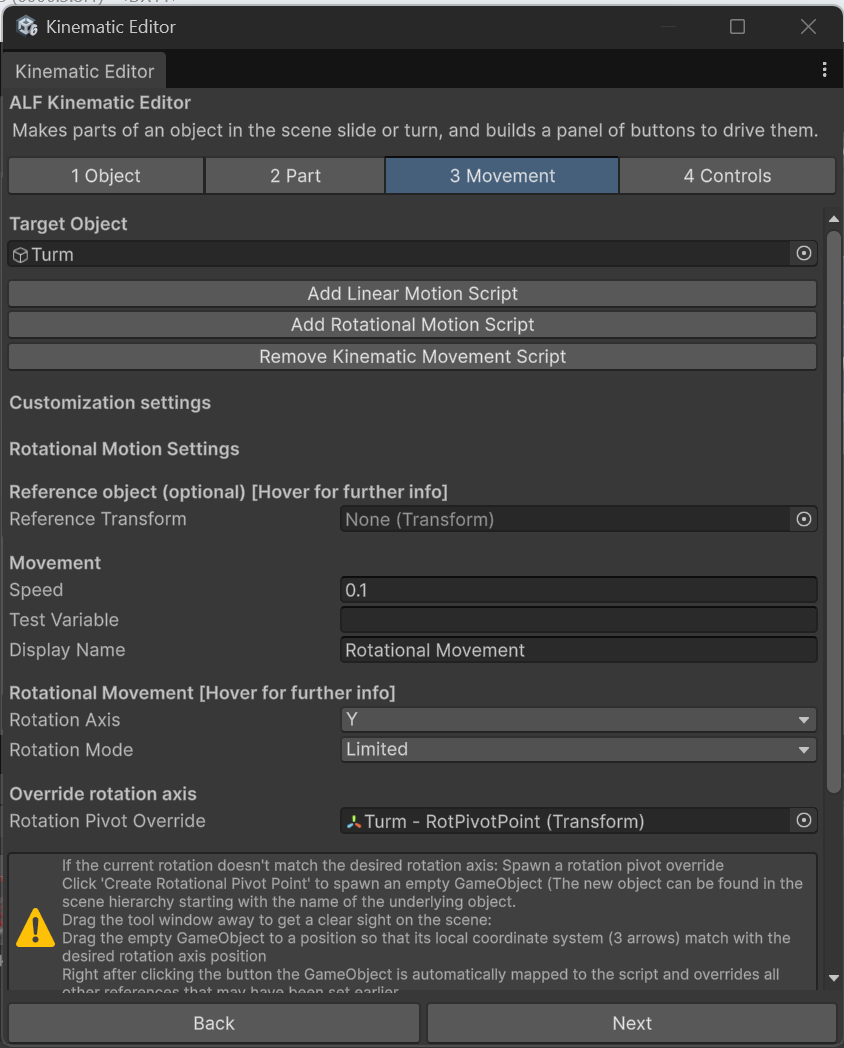
-
Check where it turns around. With the part selected, a cyan line and sphere in the Scene view mark the axis.
- If they're on the hinge, you're done.
- If they're in the middle of the part, it will spin in place instead of swinging. See Turn a part around a hinge.
-
Add buttons so learners can move it. See Add buttons that move the parts.
-
Save the scene with Ctrl+S.
Result
In the positive direction, the part turns to the upper limit and stops. In the negative direction, it turns back to the lower limit and stops.
Good to know
- Turning the wrong way? Use negative limits instead, for example lower
-90and upper0. - To stop partway, for example a valve half open, see Stop a part partway.