Create a lesson scene
Goal: make a new, empty scene for a lesson, with the player set up and ready to go.
Steps
-
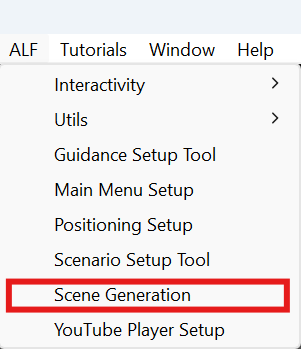
Open ALF > Scene Generation.
-
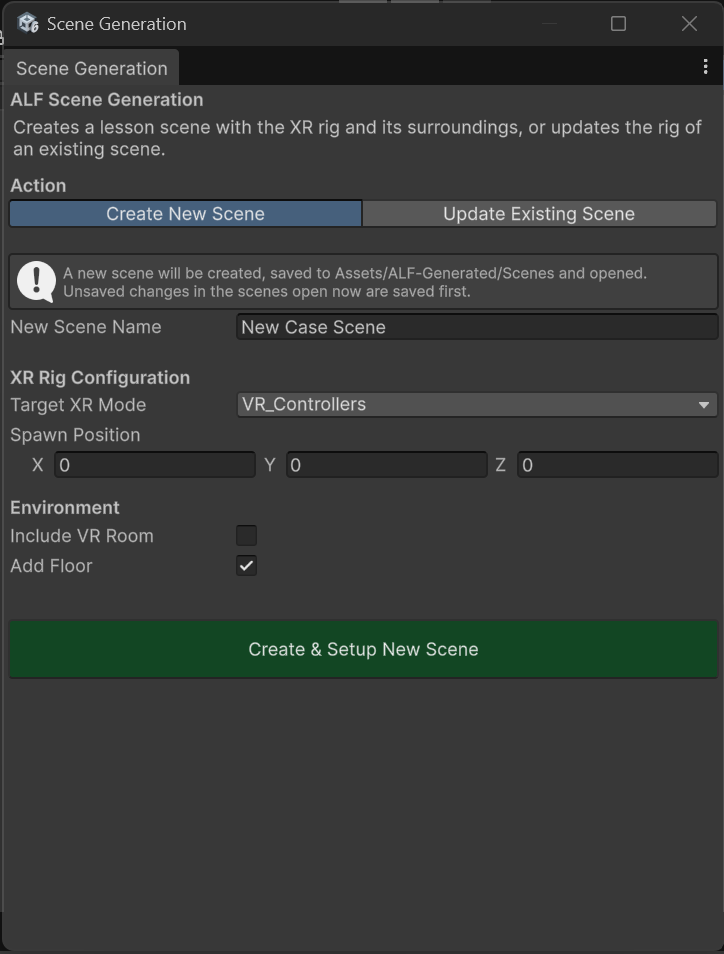
At the top, choose Create New Scene.
-
Type a New Scene Name, for example
Pump maintenance. -
Under XR Rig Configuration:
- Choose the Target XR Mode. See The five player setups.
- Leave Spawn Position at
0, 0, 0unless the learner should start somewhere else. The numbers are in metres.
-
Under Environment:
- VR: tick Include VR Room for a ready-made room, and pick it in VR Room Prefab.
- VR or AR: leave Add Floor ticked so the learner has ground to stand on.
-
Press Create & Setup New Scene.
Result
- The scene is saved in
Assets/ALF-Generated/Scenesand opened. - The player stands at the spawn position.
- Depending on your choices, there's a VR room or a floor.
You can now add content with the other ALF tools, for example Object Spawner or Scenario Setup.
Good to know
- Your open scene is saved first. Before creating the new scene, the tool saves any unsaved changes in the scenes you have open, then closes them.
- A VR room brings its own floor. While Include VR Room is ticked, Add Floor is switched off, so you don't get two floors.
- AR has no room. In AR, the learner sees the real room, so no VR room is offered.
- A scene with the same name already exists? You'll be asked whether to overwrite it.